SPARKCHAT

Your local models
In conversation

Go from a running model to a useful conversation. Ask questions, explore ideas, work with text and write code inside the same workspace.

Set up SparkChat
CHAT WITH YOUR LOCAL MODELS

Meet SparkChat
Put your models to work

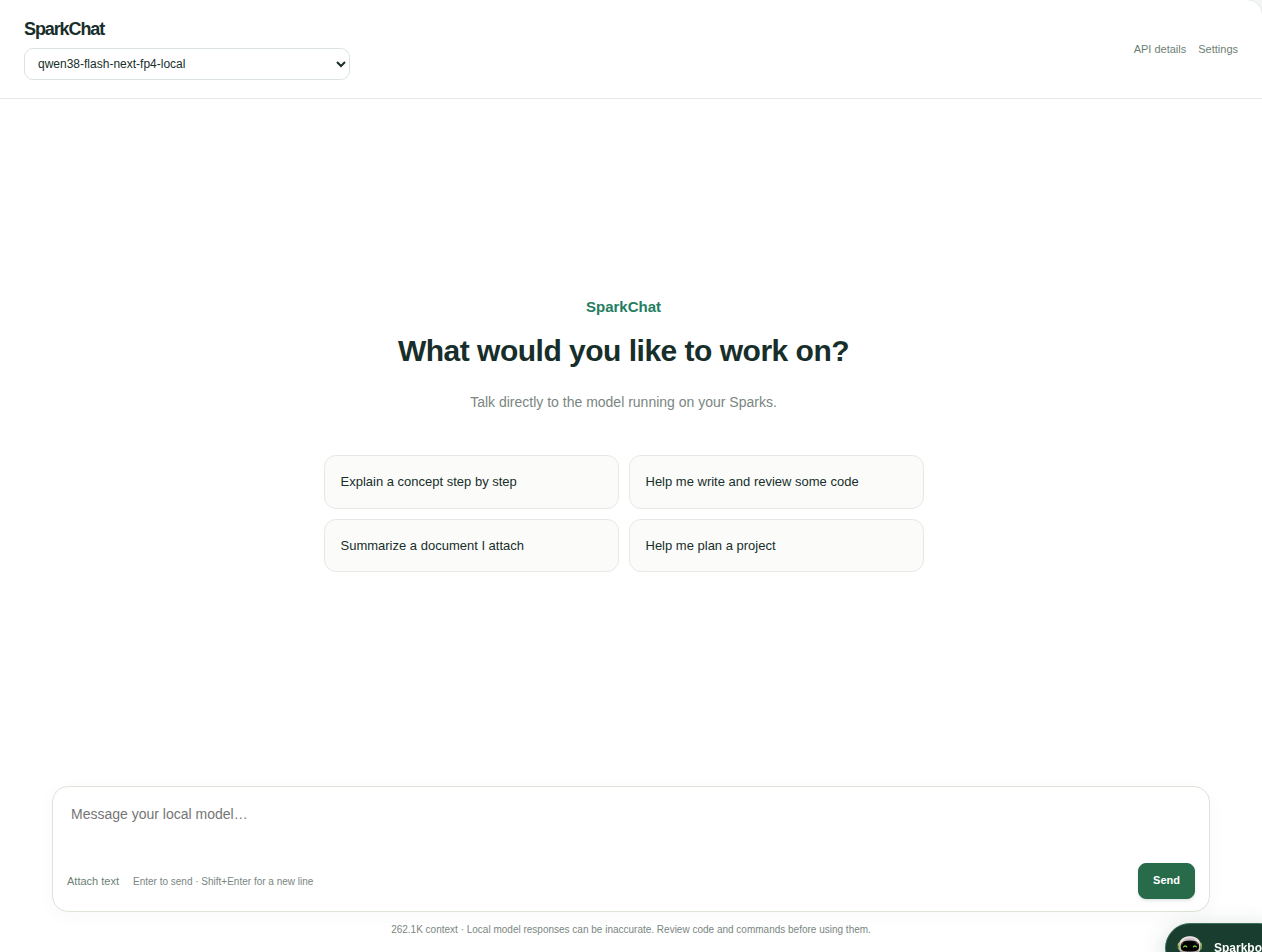
Your model is running. Now make something with it. SparkChat gives you a familiar place to ask questions, write code and explore ideas, right inside Sparkbot.

  • Watch replies stream in, with reasoning when your model provides it.
  • Keep conversations, edit prompts and regenerate answers.
  • Add context with text files and copy formatted code.
  • Pick up where you left off with saved local history.

Prefer your own tools? Copy the loaded model’s API details and ready-to-use OpenCode or Pi configuration.

Get Sparkbot and start chatting
SparkChat connected to a locally loaded Qwen model, with a message composer, model selector and API details
Actual SparkChat interface · connected to your loaded model
KEEP YOUR FLOW

Built for the way you work

CONVERSATIONS

Pick up where you left off

Search and rename saved chats, edit prompts, regenerate replies, stop generation and export a conversation.
CONTEXT

Bring your text and code

Attach text files, read Markdown and tables, and copy code blocks. A reasoning section appears when your model supplies it.

CONNECTIONS

Use your favourite client

API details shows your running model’s address and ID, with OpenCode V1/V2, Pi and cURL configuration you can copy.

SparkChat supports text conversations and text files. Voice, PDF and image-generation workflows are not included. Responses come from the model you load.

YOUR SPARKS, YOUR WORKSPACE

From first setup to everyday AI

Follow a clear setup guide, then choose how you want to work.

Get started with Sparkbot

Sparkbot in action

Read the walkthrough

Download MP4Download WebM

Credits and acknowledgements

Sparkbot is an independent project maintained by x00byte for DGX Spark owners. Screenshots and recordings show the actual application.

SparkBotLLM is adapted from LiquidAI LFM3 1.7B. llama.cpp supplies the compact CPU runtime. Model and runtime licenses apply.

Recipes retain credits to ThinkingCap, myllmbox, Mia’s AI Lab, TensorFold and their contributors. NVIDIA and ASUS identify supported hardware and do not endorse this independent project.

The corrected GX10 companion illustration uses the owner’s Sparkbot artwork and the ASUS GX10 reference supplied from PCSpecialist. The retained font is Manrope under the SIL Open Font License.